For Brokers · Performance Analytics
Know Your Numbers.
Run a Better Team.
Revenue by month, deals by broker, provider activity at a glance. The performance data you need to manage your team and your book — without a separate reporting tool.
Performance analytics are included from the Starter plan — visible to Managers and Admins.
Monthly
Revenue Breakdown
Per Broker
Performance View
CSV
Export Any View
Real-Time
Always Current
Revenue Dashboard
Your revenue picture, at a glance
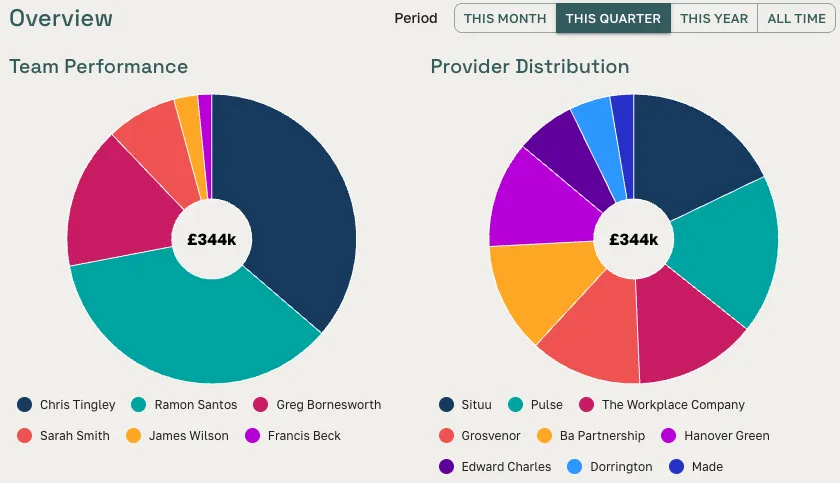
The performance dashboard gives managers and admins a real-time view of the team's revenue. See total earnings by month or quarter, broken down by broker. Switch between periods to compare, spot the quiet months, and identify where growth is coming from.
- Monthly and quarterly revenue with year-on-year comparison
- Per-broker breakdown — deals closed and commission earned
- Filter by period: current month, quarter, year, or all time
Features
Everything you need to manage performance
No spreadsheets. No separate BI tool. The analytics you need are built into the same platform where the deals happen.
Monthly and Quarterly Revenue
See total revenue broken down by month and quarter. Switch between periods to identify trends, spot quiet patches, and project ahead with confidence.
Performance by Broker
See how every member of your team is performing — deals closed, revenue generated, and share of the book. Manage by data, not by intuition.
Deals Breakdown
Track closed, active, and archived deals across the team — per broker, per period, per contact. Understand where your throughput is coming from.
Provider Activity
See which providers you're working with most — who's responding, who's contributing to closed deals, and where your most reliable provider relationships are.
CSV Export
Download any view as a spreadsheet. Share it with partners, file it for compliance, or import it into your own reporting system.
Available to Managers and Admins
Performance data is visible to team roles with Manager or Admin access — keeping deal-level detail private to the broker who owns it.
Team Tracking
See who's contributing — and who needs support
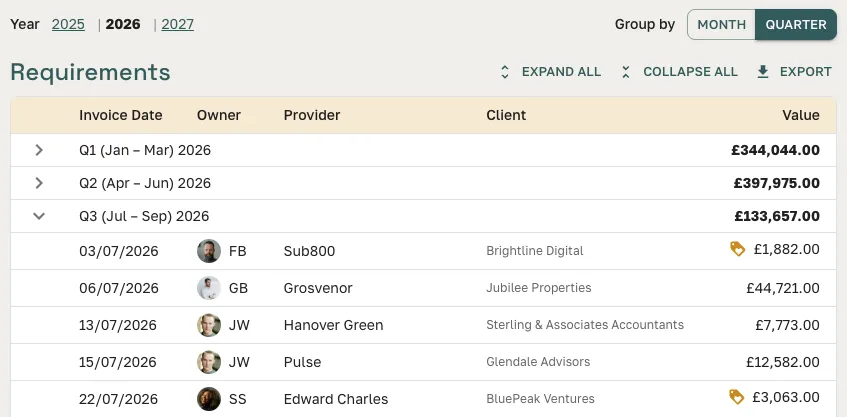
The team performance table shows every broker's activity over any selected period — deals sent, spaces shortlisted, deals closed, and commission generated. At a glance you can see whether the team is on track, who needs a hand, and where your pipeline is strongest.
- Deal count and revenue per broker, any period
- Deals, shortlists, and viewings per member
- Export the full table to CSV for offline review or partner reporting
Manual reporting vs. Great Space analytics
Without Great Space
- × Export from your CRM, clean the data, paste into a spreadsheet
- × Manually total up revenue by broker for the monthly review
- × No visibility into provider relationships or which providers drive most deals
- × Reporting is always a weekend or end-of-month exercise, never real-time
With Great Space
- Revenue dashboard is always live — no manual steps
- Per-broker performance in one table, any period
- Provider activity shows which providers contribute most to closed deals
- CSV export for external reporting in seconds
Pricing
Included from Starter
Performance analytics — revenue, deals breakdown, provider activity, and CSV export — are included from the Starter plan (£99/month). Team seats scale with your plan, from 2 on Starter to unlimited on Enterprise, so reporting grows with your brokerage.
Team management & roles →FAQ
Frequently asked questions
What performance analytics does Great Space provide for brokers?
Great Space analytics show monthly and quarterly revenue, deals closed by period, deals breakdown by stage and broker, provider response and conversion rates, and team performance across every member. All data is filterable by period, broker, and contact.
Who can see performance analytics in Great Space?
Analytics are visible to team members with Manager or Admin roles. Individual brokers see their own performance; managers and admins see the full team view. Deal-level detail remains private to the broker who owns the deal.
Can I export analytics data from Great Space?
Yes. Any analytics view can be downloaded as a CSV spreadsheet for reporting, finance reconciliation, or import into your own business intelligence tools.
Does Great Space track individual broker performance?
Yes. The analytics dashboard includes a per-broker breakdown: deals closed, revenue generated, active deals, and share of the team's book. Managers can compare performance across the team without asking brokers to self-report.
Are analytics available on all plans?
Yes. Full performance analytics — including per-broker breakdown and provider activity reporting — are included from the Starter plan. Team seats scale with your plan, from 2 on Starter to unlimited on Enterprise.
Does Great Space track which providers contribute to closed deals?
Yes. Provider activity analytics show which providers you work with most, who responds to referrals, and which providers have contributed to deals that closed. This helps brokers identify their most reliable provider relationships.
Run your team on real data
Start free and upgrade when you need team management and performance reporting.