Website Widget — For Providers
Your Website.
SpaceAI Answers.
Leads Delivered.
Add SpaceAI to any page of your website with a single line of HTML. Visitors ask about your spaces, the assistant answers from your live inventory, and every conversation lands in your account as a qualified lead — with contact details, extracted requirements, and an estimated deal value.
Available on all plans. Configure in two minutes from your Portal settings.
SpaceAI • Northbank Works
Ask about any space
SpaceAI
Hi! I can help you find the right workspace. What are you looking for?SpaceAI
We have two options available:
2nd Floor Suite, Farringdon House
23 desks · from £13,400 pcm
Ground Floor, Clerkenwell House
40 desks · from £22,000 pcm
In Action
Real conversations.
Real leads.
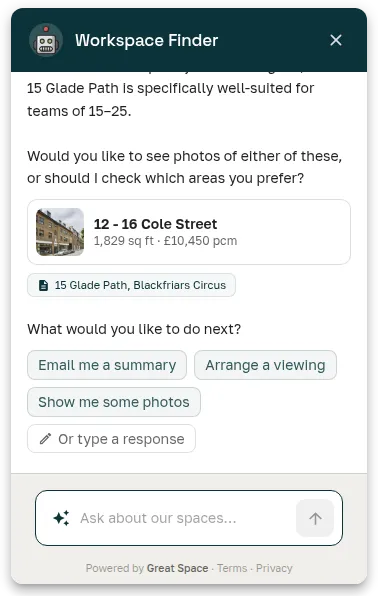
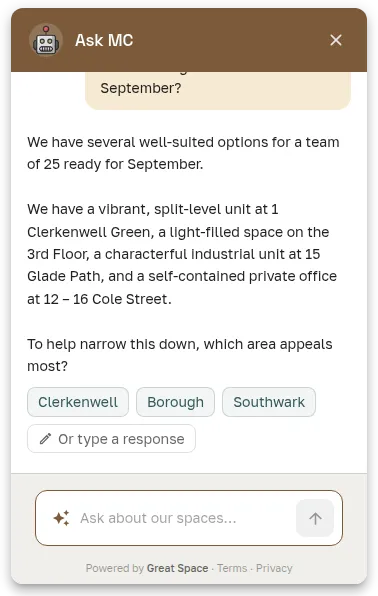
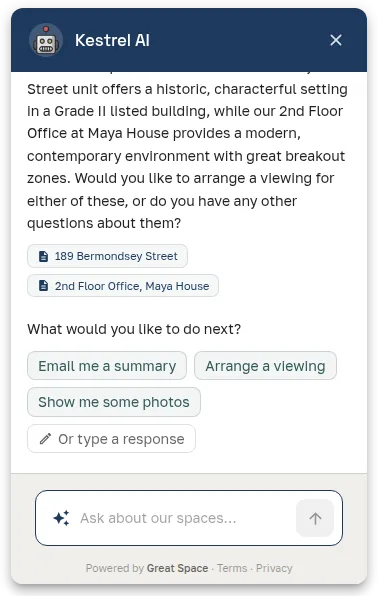
SpaceAI knows your spaces and answers like a knowledgeable team member — suggesting matching options, asking the right questions, and guiding visitors to a viewing.
How It Works
Live on your website in minutes
Configure Your Widget
Set your bot name, avatar, brand colour, and opening message in your Portal settings. Takes about two minutes.
Copy the Snippet
One line of HTML. Paste it before the closing </body> tag on any page of your website — a property listing, your homepage, a brochure page.
Visitors Chat With SpaceAI
A branded floating assistant appears on your site, answers questions about your live inventory, and captures visitor contact details.
Review Your Webchats
Every conversation appears in your Webchats dashboard with contact details, spaces suggested, AI-extracted requirements, and an estimated annual deal value.
The Install
This is all it takes to add SpaceAI to your website:
data-org="your-org-id" data-position="bottom-right"></script>
Paste before </body> on any page. Your org ID is shown in the Portal embed settings panel.
Features
Everything you need from a website assistant
SpaceAI on your website isn't a chatbot. It's an AI that knows your spaces, captures qualified leads, and keeps you informed without you having to watch a screen.
One Line of Code
Paste a single script tag before the closing </body> on any page and SpaceAI is live. No developer integration, no API keys to manage, no rebuild required.
Branded to Your Business
Set a custom bot name, avatar, opening message, and brand colour. Your visitors see your assistant — not a generic AI tool. Quick-start prompts can be tailored to the questions your visitors ask most.
Powered by Your Live Inventory
The assistant draws from your Portal at query time, not a stale snapshot. Price changes, new floors, availability updates — the assistant always cites what's actually available right now.
Every Visitor Captured as a Lead
Contact details are captured either upfront (before the chat starts) or naturally during the conversation, at a moment the assistant judges appropriate. Every visitor who engages becomes a Lead in your account with a full transcript.
AI-Enriched Lead Intelligence
When a conversation ends, SpaceAI extracts workspace requirements — location, desks, budget, term — looks up the visitor's company from their email domain, and estimates the annual deal value. Your Webchats list shows qualified, pre-digested enquiries, not raw chat logs.
Email Summaries — No Monitoring Required
When a conversation goes quiet, you receive an email with the summary, what the visitor was looking for, and the spaces suggested. No need to watch a dashboard — the platform keeps you informed when it matters.
Space Attribution Built In
Every space the assistant cites is tracked. You see which spaces each visitor viewed after the assistant mentioned them — so you know which listings are driving genuine enquiry, not just impressions.
Handoff When a Human Is Needed
If a visitor asks to speak to a person, the assistant flags the lead for your team's attention with the full conversation context. Nothing gets lost or forgotten.
Returning Visitors Pick Up Where They Left Off
A visitor who's chatted before sees their past conversations and can start a new one without re-entering their details. The assistant remembers their name and contact, so a second visit skips straight to the question.
Conversations & Deals
See every conversation — and every deal it creates
Your Conversations list shows every visitor who talked to SpaceAI — name, contact, company, and the spaces they asked about. When a conversation lands on a real requirement and matching spaces, SpaceAI turns it into a deal with an AI-estimated annual value.
When a conversation goes quiet, SpaceAI sends you an email summary with what the visitor was looking for. No polling a dashboard, no missed enquiries in a notification backlog.
- Full transcript on every conversation
- AI-extracted requirements: location, desks, budget, term
- Company identified from email domain
- Qualifying conversations become deals with an estimated annual value
Conversations
3 this weekDeals • 28 days
14
↑ 40%
Deal value
£614k
↑ 28%
Sophie Harland
Halcyon Ventures · 2 spaces suggested
£36,000/yr
Today
Marcus Chen
Brant Consulting · 3 spaces suggested
£72,000/yr
Yesterday
Unnamed visitor
1 space suggested
—
2 days ago
Customisation
Yours to brand.
Yours to configure.
The assistant carries your brand colour, your name, and your avatar — so it looks like part of your website, not a third-party widget. Every configurable surface is yours: the opening message, the quick-start prompts, and whether leads are captured upfront or mid-conversation.
- Custom bot name and circular avatar photo
- Brand colour applied automatically from your account settings
- Opening message tailored to your portfolio or property
- Launcher position: any corner of the page
SpaceAI
Northbank Works
Ask MC
Marylebone Collective
Kestrel AI
Kestrel Offices
FAQ
Frequently asked questions
How do I add the SpaceAI chat widget to my website?
Add a single line of HTML to any page of your website. The script tag loads SpaceAI and launches the chat button automatically. No JavaScript framework, back-end changes, or developer knowledge is required — the embed works on any website platform.
Can I customise the SpaceAI chat widget to match my brand?
Yes. The widget can be configured with your brand name, brand colour, custom avatar, and an opening message. Configuration is done from your Great Space Portal settings — no code editing required.
What information does the chat widget capture from visitors?
The widget captures the visitor's name, email, and phone number (in deferred capture mode, contact details are collected later in the conversation rather than upfront). It also extracts workspace requirements from the conversation — location, desk count, budget, and term — and, when the visitor's email uses a company domain, looks up their company automatically.
Where do leads from the chat widget appear?
Every chat conversation arrives in your Great Space account as a lead — with the visitor's contact details, extracted requirements, a full conversation transcript, the spaces the assistant suggested, and an estimated deal value based on the visitor's stated budget and term.
Is the SpaceAI chat widget free to use?
Yes. The chat widget is available on all workspace provider plans, including the free tier. Configure it in two minutes from your Portal settings.
What happens when a visitor wants a viewing or asks something the assistant can't answer?
If a visitor requests a viewing, the lead is flagged with a viewing request so you can follow up directly. If the assistant reaches a question it cannot answer from your inventory, it offers to connect the visitor with your team — the handoff request is captured on the lead record.
Turn your website into a lead machine
Set up in two minutes. No developer required beyond pasting one line of HTML.