
For Workspace Providers
Onboard Your Portfolio in Minutes.
Update by Email.
Upload a spreadsheet, email an attachment, or just type your updates into the body of an email — Great Space’s AI extracts every field, flags anything ambiguous for a quick review, and writes the rest straight into your live inventory.
Set up in ten minutes. Receiving and responding to referrals is always free.
Benefits
Everything in.
Nothing re-typed.
Three Ways to Get Your Spaces In
Drop a spreadsheet into the platform, email an attachment to the Great Space import address, or just type availability changes into the body of an email. All three feed the same pipeline — pick whichever fits how your team already works. We verify the sender against your authorised team members before applying any changes, so only your operation can update your inventory.
AI Extracts Every Field
Address, capacity, pricing, availability, key terms, photos via building URL — SpaceAI reads your data and maps it to the right place. No column-mapping wizards, no template downloads, no proprietary format to learn.
Only Review What Needs a Human Eye
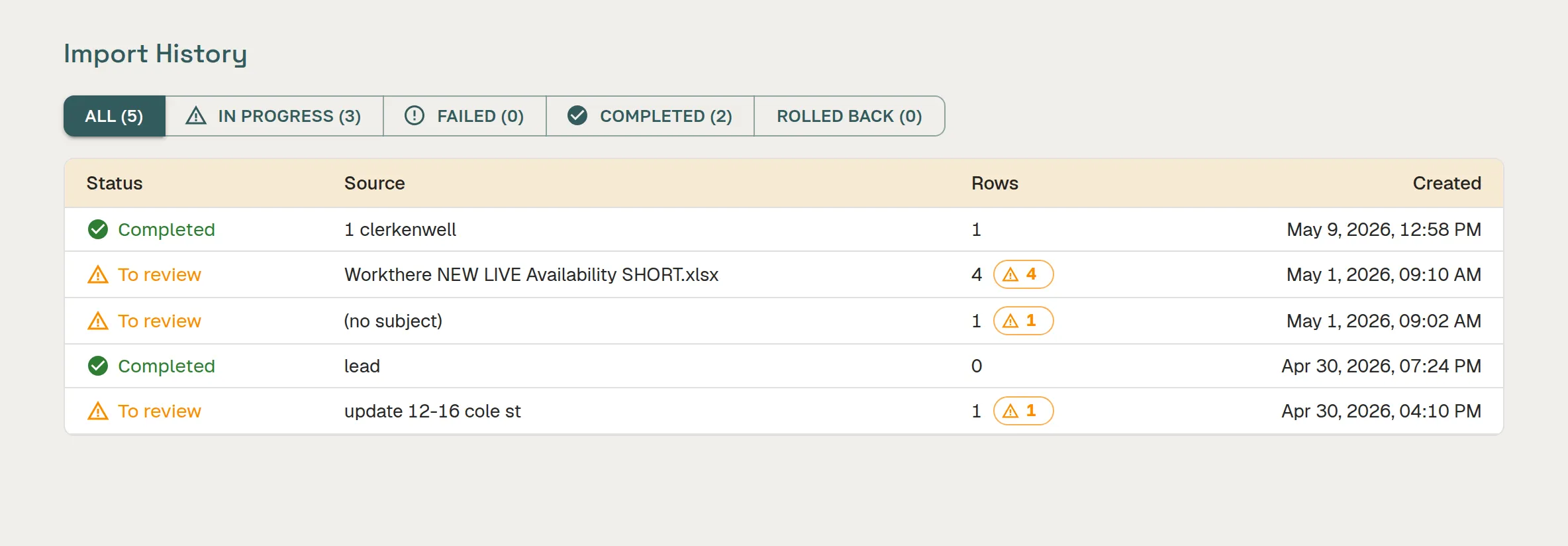
Clean, confident rows apply automatically. Anything ambiguous lands in a review queue with a clear before/after so you can accept, reject, or edit in seconds — instead of checking every line by hand.
Update Availability by Email
When a floor lets, just reply to the weekly check-in or forward your in-house availability email to the Great Space import address. We verify it's coming from one of your authorised team members, then ingest the update and refresh your live listings within minutes — no portal login required.
Full Audit Trail, Instant Rollback
Every change is stamped with its source, timestamp, and the original input. Made a mistake on a big import? Roll the whole batch back from a single button — or just the rows you flag.
Onboard Fifty Spaces in Under Thirty Minutes
Bulk import is built for portfolio providers. Our target is fifty spaces from a single spreadsheet, fully live and ready to receive referrals, in under thirty minutes from first upload.
Fix Gaps After the Fact
Space came in without a brochure or photos? Upload a PDF or paste a listing URL and SpaceAI gap-fills what's missing — appending photos, attaching the brochure, geocoding the building address — without ever overwriting what you've already curated.
Product screenshot
How It Works
From spreadsheet to live, in under thirty minutes
Export Your Spaces
Pull a spreadsheet from your existing system. Doesn't matter what shape it's in — SpaceAI maps the fields. No template to download.
Send It In
Upload the file directly, or email it as an attachment to the Great Space import address. Plain text in the email body works too — we verify the sender against your authorised team members before applying any changes.
Quick Review
Clean rows apply automatically. Review the handful of rows that need a human eye — accept, reject, or edit in seconds.
You're Live
Your spaces are live, receiving referrals, and visible to every connected broker and data platform. Update by email from there on.
Scheduled Updates
Stay current without logging in.
Once your portfolio is live, keeping it current is just as simple. Set up a daily or weekly schedule and your inventory updates automatically — or use any of the three update channels whenever you need to push a change.
Spreadsheet Upload
Export your weekly availability report from whatever system you already use — a Google Sheet, Airtable, your own property management tool — and upload it directly or schedule a recurring pull. SpaceAI maps the columns and applies the changes.
Email Attachment
Forward your weekly availability email — with the spreadsheet attached — to the Great Space import address. We verify the sender against your authorised team, extract the changes, and apply them to your live inventory within minutes. No login required.
Plain-Text Email
Type your update in the body of an email — “Unit 4B is now available from 1 July at £8,500 pcm” — and send it to the import address. SpaceAI reads the natural language, identifies the space, and applies the change. No attachment, no template.
Automated daily or weekly schedule
Connect a Google Sheet, Airtable base, or shared document once and set a sync cadence. Great Space checks the source on your schedule, identifies what’s changed, and updates your live listings automatically — without any action from your team.
Scheduled & automated updates →Built for portfolio providers
Most workspace platforms make providers re-enter every space, one form at a time, in their proprietary format. We don’t. Whatever shape your data is in — a spreadsheet your team already maintains, a system export, even prose in an email — the platform reads it and does the work.
You get a full portfolio live without a single re-typing session. And once you’re live, you keep your inventory current the same way: forward an email, paste an update, get on with your day.
No template downloads. No column-mapping wizards. No proprietary format to learn.
See how SpaceAI enriches your listings →FAQ
Frequently asked questions
How do I import my workspace portfolio into Great Space?
Upload a spreadsheet with your buildings and units, or connect a Google Sheet. SpaceAI maps your columns to Great Space fields automatically, flags anything it cannot match, and applies clean data across your portfolio in minutes. You review the import before it goes live.
What file formats does Great Space accept for bulk import?
Great Space accepts CSV and Excel files, as well as Google Sheets via direct connection. Column headers do not need to follow a specific format — SpaceAI reads and maps them to the right fields using AI.
Can I import multiple buildings and units in one upload?
Yes. A single import can cover your entire portfolio — multiple buildings, floors, and individual units — in one file. Great Space creates a hierarchical structure (building → floor → unit) from the data automatically.
What happens if SpaceAI cannot match a column in my spreadsheet?
The import review screen flags unmatched columns and asks you to confirm the mapping or skip the field. Nothing is written to your account until you approve the result — there is no risk of corrupted data from a bad mapping.
Does bulk import work alongside the scheduled import feature?
Yes. Bulk import is typically used to get a portfolio live quickly. Once the initial import is complete, Scheduled & Automated Updates can keep availability and pricing current without repeat manual uploads.
Is there a limit on how many spaces I can import?
No. Great Space imposes no per-import or per-account cap on the number of spaces. Import your full portfolio regardless of size.
Get your whole portfolio live, fast
Spreadsheet, email attachment, or a line of plain text. SpaceAI takes it from there.
Create Your Free Profile