
Broker Portals — For Workspace Providers
One Live Link to Your Inventory.
Full Visibility on Who’s Looking.
Stop sending PDFs that go stale the moment you hit send. Your Broker Portal is a live, shareable view of your spaces — public for broad broker discovery, or private with granular subscriber control. See who's opening it — named brokers once they've signed in, anonymous visitors while it's public — what they viewed, and where they spent their time.
Receiving and responding to referrals is always free for workspace providers.
Features
One source.
Total visibility.
Your Broker Portal does the work that used to require a separate brochure, a follow-up email, and a phone call to confirm what's still available.
One Live Source of Truth
Maintain your spaces, photos, pricing, and availability once. Every share link, every subscribed broker, and every data platform sees the same up-to-date view — automatically, in real time.
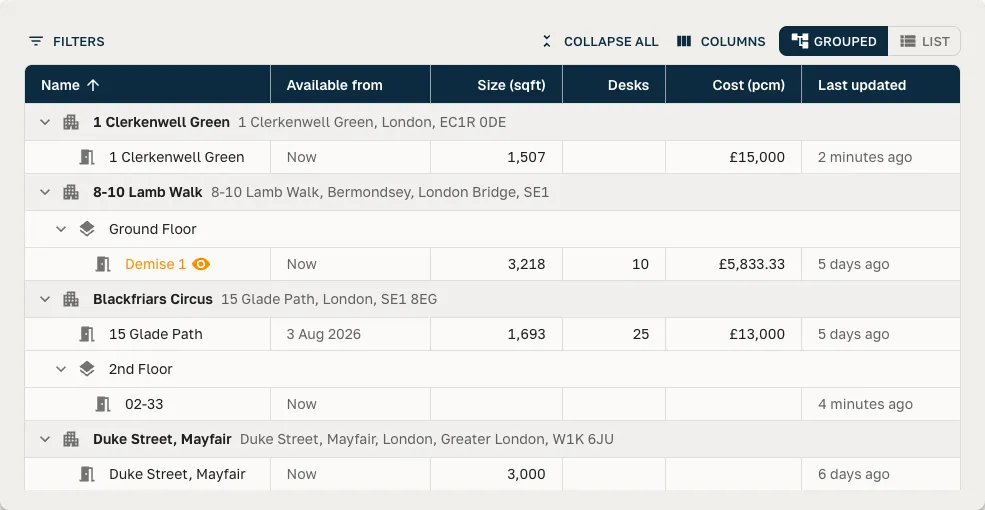
One Link, Send to Anyone
Generate a shareable Broker Portal link in a click. Brokers click straight through to your inventory — no login, no account creation, no friction. The link stays live until you revoke it.
See Who's Engaging — Right Down to the Building
Your Portal's Viewers view captures everyone who opens it — named brokers and data platforms once they've signed in, plus anonymous visitors while your Portal is public — so attribution is activity-first, not limited to the people who subscribed. Track opens, space views, brochure downloads, and saves over time. Per-share dashboards show which brokers are actively pitching your portfolio, and location-level analytics break activity down by individual building — so you know which specific spaces are pulling consistent interest, not just aggregate views. Each building's stats also show its win rate across referrals and deals, so you can see which spaces are actually converting.
Revocable, Time-Limited Access
Share links can be set to expire on a schedule or revoked at any moment. You keep control of who sees what — even after the link has left your inbox.
Brokers Can Subscribe to Your Broker Portal
When a verified broker opens your Broker Portal, they can subscribe in one click — then they're notified when you post updates and land straight back on your live data whenever they revisit your portfolio, never a stale PDF in their downloads folder.
One Surface for Brokers and Data Platforms
The same Broker Portal that powers a broker share also powers Data Platform subscriptions. Update your inventory once, and it flows to every audience that matters — broker, client, and aggregator alike.
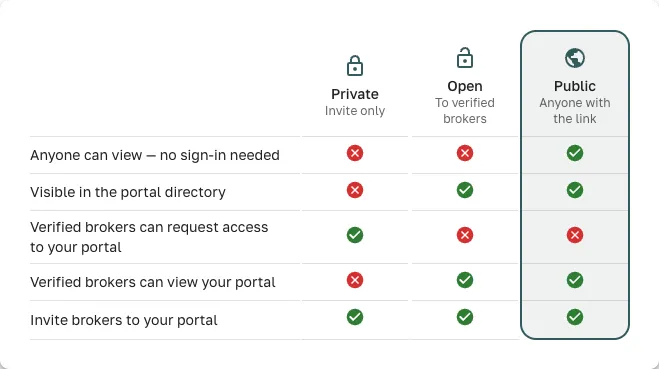
Public, Open, or Private — Your Choice
Public makes your live availability viewable by anyone, no sign-in required — maximum reach. Open lists you in the built-in Broker Portal directory, where any verified broker can subscribe and see availability instantly, with no approval step. Private keeps you in control: invite brokers directly, or approve access requests one at a time. Change modes instantly from your Broker Portal settings — no reconfiguration of existing shares needed.
Manage Every Subscriber in One Place
Your Viewers view tracks everyone who opens the Portal; subscribers are the verified brokers and data platforms who've opted in to follow it for update notifications and quick access. A single table shows every active subscriber alongside when they joined. Invite new contacts directly from the Broker Portal, resend a pending invite with one click, or revoke access the moment a relationship ends. Pending invites are tracked separately so nothing slips through.
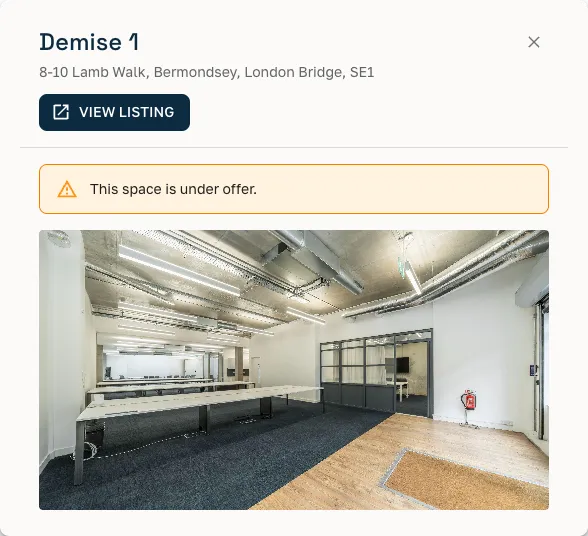
Status Brokers Can Trust — Including Under Offer
Every space carries a live status: published and ready, under offer with a clear banner so brokers know it's spoken for but still worth tracking, or available from a set future date. No more emailing to ask 'is this still on' — the answer is always current in your Broker Portal.
Match Your Company Branding
Your Broker Portal inherits your organisation's branding automatically — logo, primary and secondary colours for light and dark mode, and heading and body fonts. Set it once in your account settings and every share link, presentation, and PDF looks like it came from you, not a generic template.
Connect Your Own AI Assistant
Query your live inventory from Claude, ChatGPT, or your own internal tooling via a read-only MCP connection — filter spaces, ask questions in plain English, and pull quick stats without leaving your AI workspace. Access is scoped to your organisation and controlled by a personal access token you create and can revoke at any time.
How It Works
From inventory to broker engagement
Build Your Broker Portal
Add your spaces with photos, pricing, and key terms. SpaceAI fills in landmarks, transport, and neighbourhood context automatically.
Share or Invite
Generate a public share link for broad broker discovery, or keep it private and invite specific brokers and data platforms by email. They access your live inventory — no account required.
See the Engagement
Watch opens, views, and downloads in real time. Location-level analytics show which buildings are drawing the most broker interest — and from whom.
Stay Current Automatically
Update a price, add a floor, change availability. Every active share and subscribed Broker Portal sees the change instantly.
Subscriber Management
Turn visitors into subscribers you can reach — and control access instantly
When your Portal is public, anyone can open it — you see them all in your Viewers view. Subscribers go a step further: verified brokers and data platforms who follow your Broker Portal for update notifications and quick access. Manage them in a single table — name, organisation, access status, and when they subscribed — with no spreadsheet and no chasing to see if someone got the link.
- Set visibility to public (anyone can view, no sign-in), open (any verified broker subscribes instantly), or private (you invite or approve each broker) — switch any time
- Invite subscribers directly by email — no portal account required on their end
- Resend a pending invite with one click if it got buried in an inbox
- On private portals, revoke a broker's access instantly — they lose access on their next page load
- Pending invites tracked in a separate row so nothing slips through
Broker Portal Subscribers
3 active · 1 pending
Sarah Chen
Lambert & Partners · viewed 2 hours ago
James Whitmore
Meridian Advisory · viewed yesterday
CoworkingSearch.com
Data Platform · last sync 4 days ago
Tom Redshaw
Atlas Workspace Brokers · invited 3 days ago
+ Invite subscriber
For Brokers
Brokers subscribe to your Broker Portal and come back to it
When a verified broker opens your Broker Portal, they can subscribe in one click — and they're notified whenever you post updates. Every subsequent deal that matches your area, they’re back on your live inventory — no email required, no stale PDF to reissue. Your Broker Portal is the relationship that persists between deals.
FAQ
Frequently asked questions
What is a Great Space Broker Portal?
A Broker Portal is a structured, shareable view of a workspace provider's live inventory — spaces, pricing, availability, photos, and key terms — published in one place. Brokers open it to check current availability without emailing the provider; data platforms subscribe to receive a live feed of the inventory.
Who can see my Broker Portal?
Anyone you share the link with. Brokers who visit can subscribe to the Broker Portal for ongoing access. Data platforms you authorise can subscribe to receive a live inventory feed. You can see exactly who has opened your Broker Portal and when.
How do I keep my Broker Portal up to date?
Update your inventory in Great Space — availability, pricing, and space details — and every subscriber sees the change automatically. There is no separate update to push; your Broker Portal reflects your current inventory in real time.
Is a Broker Portal the same as a listing on a property portal?
No. A Broker Portal is a live, shareable inventory view for brokers and data platforms — not a public-facing listing page. It is designed for professional distribution: brokers who deal directly with your spaces, not website visitors searching for a desk.
Does it cost anything to create a Broker Portal?
Broker Portals are included from the Provider Basic plan upwards. Receiving and responding to broker referrals is always free, but publishing and distributing your own inventory through a Portal is a paid feature. Once you are on Provider Basic or above there is no per-Portal charge — create and share as many as you need.
Can brokers use my Broker Portal to generate client shortlists?
Yes. Brokers who subscribe to your Broker Portal can pull spaces from it directly into client presentations, and their SpaceAI assistant can answer client questions about your inventory in natural language.
What does 'Under Offer' mean on a space in a Broker Portal?
Under Offer means a space is still on the market but has an accepted offer against it. It stays visible in your Broker Portal with a clear banner, rather than disappearing, so brokers know it's spoken for but can keep it in mind if the deal falls through. You can also set a space to become available from a future date — brokers see "Available from" with the date, so they can match it to a client's move-in timeline even before it's ready to occupy.
Can brokers download a PDF for a single space in my Broker Portal?
Yes. Any space in your Broker Portal can be downloaded as a branded, standalone PDF — useful when a broker needs a document for the file or to forward outside the platform, without generating a full client presentation.
Can I connect my Broker Portal to Claude or ChatGPT?
Yes. Great Space runs a read-only MCP (Model Context Protocol) server so you can query your live inventory from Claude, ChatGPT, or your own internal tooling — filter spaces, ask natural-language questions, and pull quick stats. You authenticate with a personal access token created from your profile page, and it's scoped to your organisation only. An assistant connected this way can look at your spaces but can never change, publish, or delete anything.
One link.
Every broker who needs it.
Live inventory, subscriber management, and engagement analytics — all included with your free provider profile.