Availability Bulletin — For Broker Relations Teams
Your weekly availability email, ready in five minutes
Most providers email every broker they work with once a week. Great Space builds that email for you: what changed since last week, your featured building and your news, in your brand. You send it from your own mailbox, and every space links to your live Broker Portal, so you can see which brokers clicked.
Included from Provider Plus. Receiving and responding to referrals is always free.
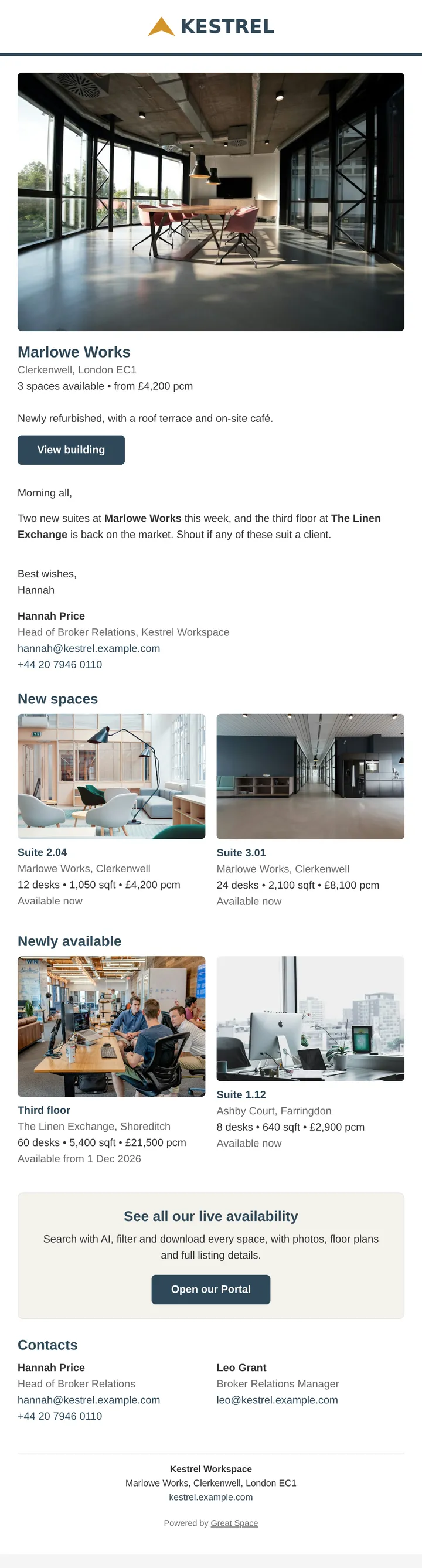
The weekly sheet, upgraded
What is the Great Space Availability Bulletin?
The Availability Bulletin is a branded weekly email that a workspace provider builds in Great Space and sends to its brokers from its own mailbox. It's assembled from your live inventory, so it always reflects what changed since the last bulletin you sent, and every space links to your Broker Portal with the issue tagged, so broker clicks are counted.
Stop attaching PDFs. Send brokers one email that points to live availability, with photos, floor plans, filters and AI search behind every link.
Built for broker relations
The email your broker relations team already sends, without the Monday scramble
Broker relations is a provider's most direct line to new occupiers. The weekly availability email is how that relationship stays warm, and it's usually the most manual job on the team.
Monday morning, from memory
Someone works out what let, what came back and what changed price since last week, then rebuilds the sheet by hand.
A PDF that's stale by Tuesday
The attachment is out of date the day after it lands, with no photos and nothing a broker can search or forward to a client.
No idea who read it
It goes to every broker you work with, and you never find out which of them opened it or what they looked at.
How it works
From live inventory to a broker's inbox
We assemble what changed
New spaces, newly available units, price changes, under offer and coming soon, all worked out from your inventory since the last bulletin you sent.
You shape it
Pick a design, feature a building, reorder sections and add your own news. SpaceAI writes an introduction from the week's changes, which you can edit or regenerate.
Send it from your own mailbox
Copy the email into Gmail or Apple Mail, or download it as an Outlook draft. Copy your broker contacts' addresses for BCC in one click.
See who clicked
Every space links to your Broker Portal, tagged to that issue. Past Bulletins shows opens per issue and the brokers who clicked through.
What goes in
Everything a broker scans for, nothing you have to work out
"Since last week" means since the last bulletin you marked as sent, so a skipped week still compares correctly. Empty sections hide themselves.
- Featured building, with its photo and what's available
- An introduction SpaceAI writes from the week's changes
- Featured availability: up to six buildings or units you choose
- New spaces and newly available units since your last bulletin
- Your news, from building launches to open days
- Under offer, coming soon and price changes, when you want them
- Your broker relations contacts, and a personal sign-off
- A link to your full, live availability on your Broker Portal
An introduction that writes itself
SpaceAI reads the rest of the email and drafts a short introduction to it. Edit it, or regenerate it. It remembers recent introductions so this week's doesn't read like last week's, and it tells you if the email has changed since it was written.
From your mailbox, on your schedule
We don't send it for you. Brokers hear from the person they already work with, not a platform, and your email doesn't arrive alongside a hundred others at 9am on Monday.
Designs
Three designs, all in your brand
Your logo and brand colours come from your account. Want something of your own? We build custom designs as a service.
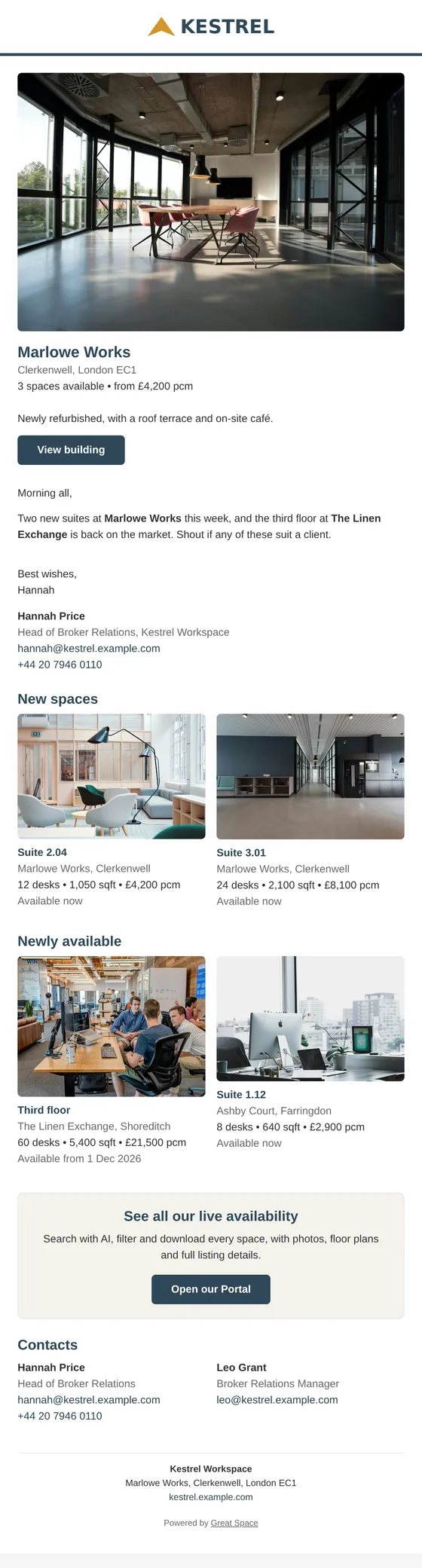
Showcase
A featured-building hero with two-column space cards and photos.
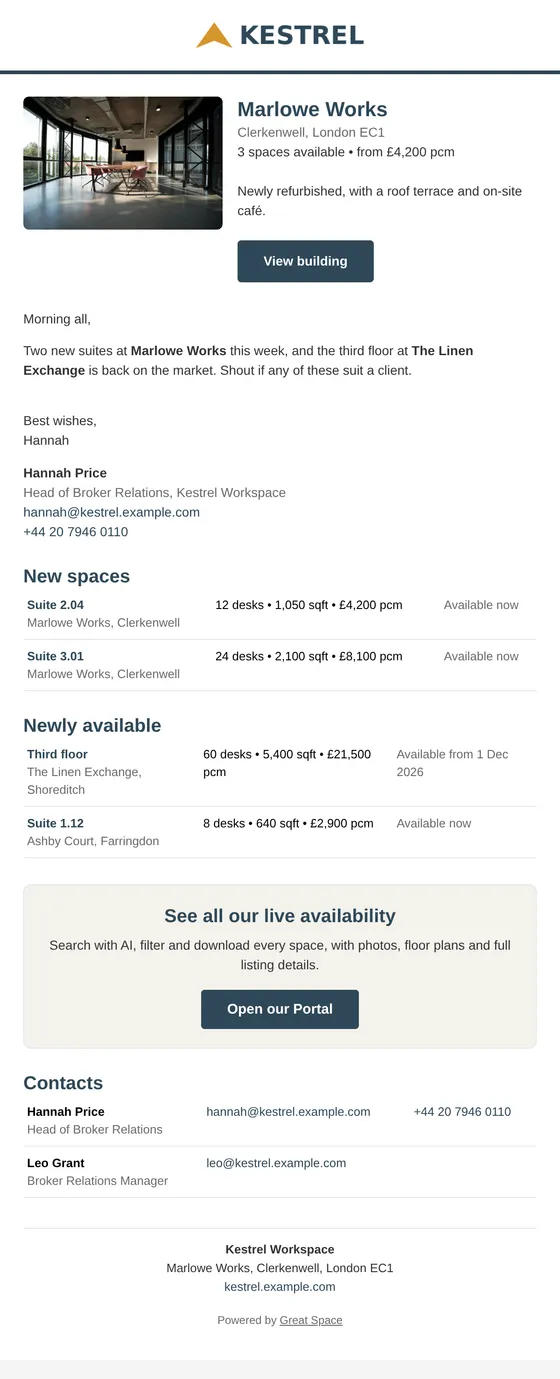
Briefing
Dense rows of spaces, the closest match to the availability sheet you send today.
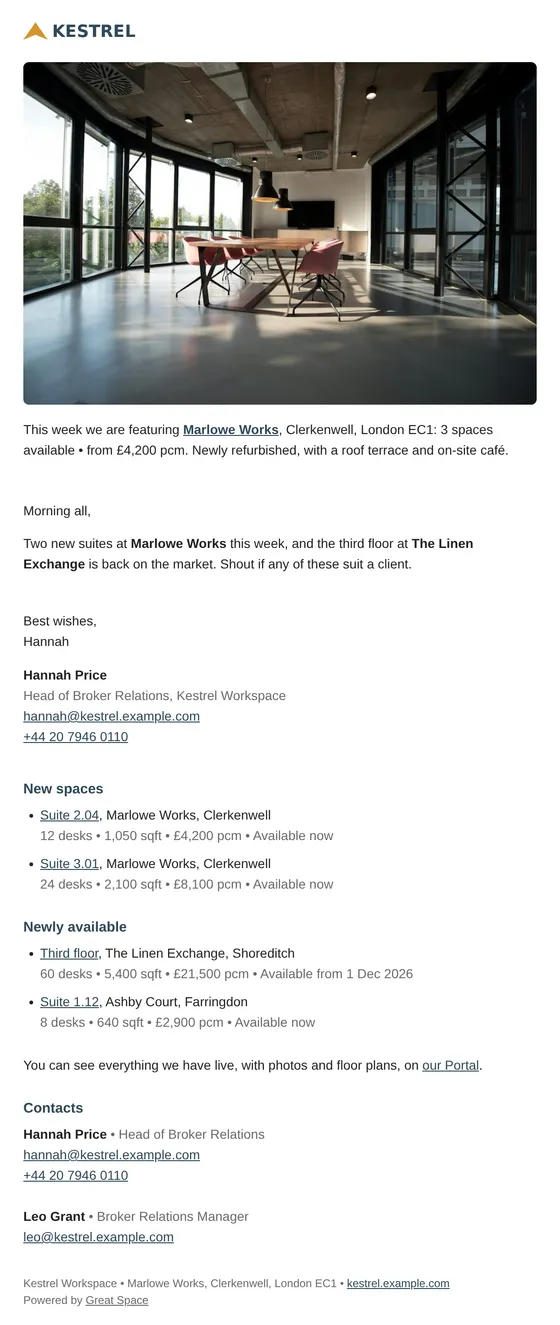
Letter
A plain, personal email: no banner, one photo, spaces as short lines.
Proof it works
See which brokers clicked through from this week's bulletin
Every link in a bulletin is tagged to that issue. Bulletin views show on your Broker Portal as their own line on the views chart, and Past Bulletins lists opens per issue and the brokers who opened it. Pair it with broker relations intelligence in your Deal CRM and you can see which relationships turn into referrals.
- No account needed to read it. A bulletin link opens your Portal for 30 days, even a private one. Revoke any issue's access whenever you like.
- No tracking pixel. We count clicks to your Portal, not opens. Pixels are unreliable since Apple Mail Privacy Protection, and they don't belong in a broker's inbox.
- Forwarded to a client? It still works. The link opens the same live availability for whoever the broker shares it with.
FAQ
Common questions about the Availability Bulletin
What is an availability bulletin?
An availability bulletin is the email a workspace provider sends to the brokers it works with, usually weekly, listing the spaces it has available. Great Space builds it for you from your live inventory: what's new, what's newly available, what changed price, and a featured building, in your brand, with every space linking to your Broker Portal.
Does Great Space send the email for me?
No, deliberately. You copy the finished email into your own email client, or download it as an Outlook draft, and send it from your own address on your own schedule. Brokers get it from the person they already work with, not from a platform, and it doesn't land alongside a hundred near-identical emails at 9am on Monday.
Who on a provider's team is the bulletin for?
Whoever looks after your broker relationships: broker relations managers, heads of agency and broker relations, leasing and sales teams. Any member of your Great Space account can build, copy and send a bulletin; it's day-to-day sales work, not an admin setting.
How do I know which brokers read it?
Every link in a bulletin carries a reference to that issue. When a broker clicks through to your Broker Portal, the view is counted against the bulletin, and Past Bulletins shows opens per issue and the brokers who opened it. Your Portal analytics separate bulletin views from direct visits. There's no tracking pixel.
Do brokers need a Great Space account to view the spaces?
No. A link from a bulletin opens your Broker Portal for 30 days after you mark the issue as sent, even if your Portal is private. After that your Portal's normal access applies. You can revoke an issue's access at any time from Past Bulletins.
Which plans include the Availability Bulletin?
The Availability Bulletin is included from Provider Plus. It links to your Broker Portal, so you'll want a Portal set up first. Receiving and responding to broker referrals stays free on every plan.
Give your broker relations team their Monday back
Build next week's availability email from your live inventory. Included from Provider Plus.