Provider Portals — For Brokers
Your Trusted Providers, Always Current.
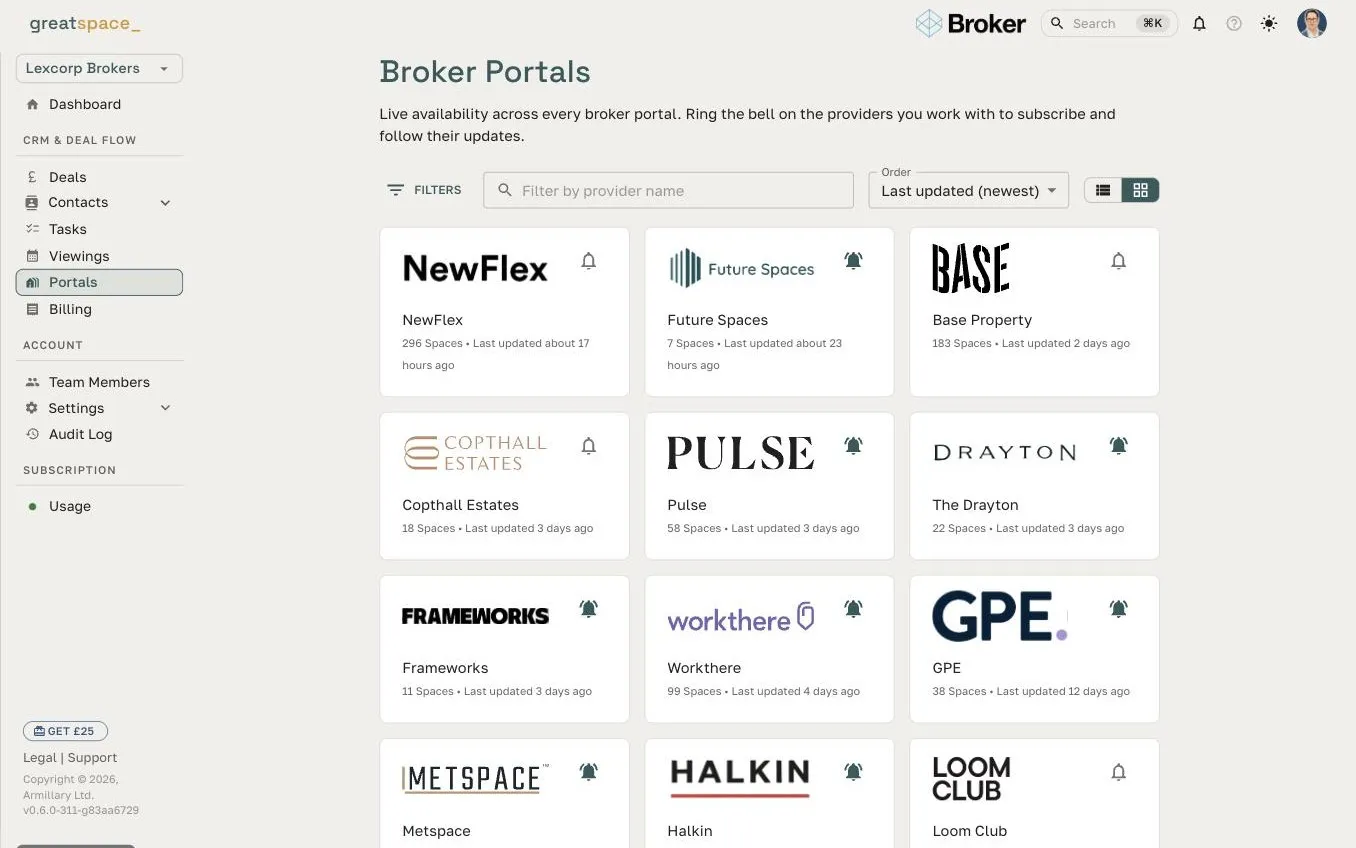
When you open a provider's portal, subscribe in one click. Next time a client needs space in their area, you're back on live inventory — current pricing, current availability, no email to the provider required.
Subscribing to Provider Portals is available on every plan, including Starter.
Features
Your provider library, built over time
Every deal you work leaves behind a stronger provider network. Provider Portals are how that network compounds — no maintenance required.
Subscribe to Any Provider Portal in One Click
When you open a provider's portal — shared directly or discovered through the platform — subscribe in a single click. It stays in your library until you unsubscribe.
Always-Current Inventory
Every subscribed Provider Portal stays live. When a provider updates pricing, adds a floor, or changes availability, your subscribed view reflects it instantly. No PDFs to chase, no 'let me check with the provider'.
Build Your Provider Library Over Time
Every deal you work, every Provider Portal you open, your library grows. Over time it becomes a curated network of trusted providers — people whose inventory you know, whose response quality you understand.
Browse the Provider Portal Directory
Don't wait to be sent a link. From your Provider Portals, open the built-in directory of providers whose Provider Portals are public — searchable by provider name and subscribable in one click. A faster way to build your library without any back-and-forth.
Check Subscribed Portals Before Sending a Deal
When a new enquiry comes in, your subscribed Provider Portals are the first place to look. You may already have two or three strong options from providers you know — enough to give the client an initial view before the formal deal goes out.
Context Before Every Client Meeting
Pull up a provider's live inventory on your phone before a client call. Current pricing, current availability, current photos — without emailing anyone the night before.
No Maintenance Required
You subscribe once and it stays current. There's no version to re-download, no link to refresh, no spreadsheet to update. The provider keeps their Provider Portal live; you benefit automatically.
Deal Workflow
Check your subscribed Provider Portals before you send a deal
When a new client enquiry comes in, your subscribed Provider Portals are the first place to look. You already know the providers, you know the inventory is live, and you can pull any space straight into the deal as a sourced candidate — on demand, before a single referral has gone out.
When you do send the deal through Great Space, provider responses from providers whose Provider Portals you've subscribed to carry that context with them. You're not evaluating a cold submission — you're evaluating a response from a provider you already know.
- Reference live provider availability in your first client response
- Add any space from a subscribed portal straight to a deal as a sourced candidate — no need to wait for referral responses to come in
- Context on providers you've worked with before — viewings, deals, history
- Export any portal's inventory as CSV, Excel, or JSON when you need it offline
New enquiry from Ashworth & Partners
Looking for 25–40 desks in Shoreditch or Bethnal Green, £18k–24k pcm, 12–24 months.
From your subscribed Provider Portals
Fora — Shoreditch
30–45 desks available · from £19,500 pcm
Mindspace — Aldgate
20–50 desks available · from £17,000 pcm
Inside a Provider Portal
Browse live inventory.
Ask anything.
No emails.
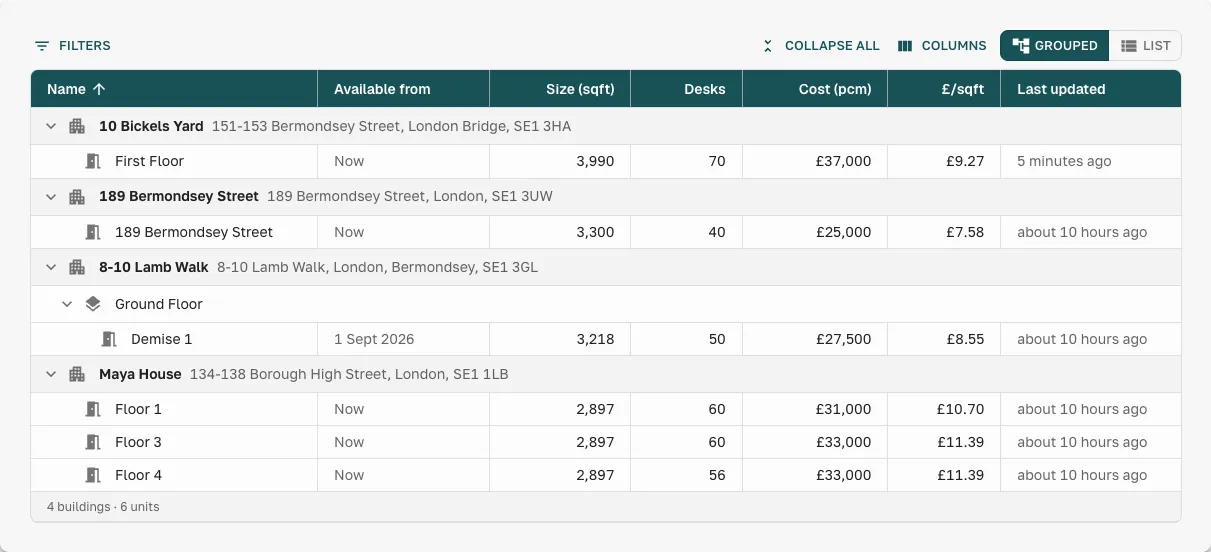
Open any subscribed Provider Portal and see current availability — grouped by building, with sizes, desk counts, pricing, and £/sq ft, all updated in real time. Photos and floor plans are there too.
Ask, Don’t Email
Not sure?
Just ask the portal.
SpaceAI lives inside every subscribed Provider Portal. Ask about a specific space, the local area, or who handles viewings — and get an answer without waiting on an email reply.
FAQ
Frequently asked questions
What are Provider Portals in Great Space?
Provider Portals is a broker feature that lets you subscribe to any provider's portal in one click. Your subscribed Provider Portals build into a personal library of trusted provider inventory — always live, always current, available the next time a client needs space in that provider's area.
How do I subscribe to a provider's portal?
When you open a provider's portal, click Subscribe. It appears in your Provider Portals library immediately. Next time a client's deal matches that provider's area, you can go straight to their current availability without contacting the provider first.
Do subscribed Provider Portals update automatically?
Yes. Providers maintain their inventory in Great Space directly. When they update pricing, availability, or space details, every broker who has subscribed to their Provider Portal sees the change automatically. You never need to ask a provider for a current brochure or availability list.
Can I use subscribed Provider Portals to build client presentations?
Yes. Spaces from your subscribed Provider Portals can be included in client presentations directly. You can also ask the SpaceAI assistant questions about any subscribed Provider Portal in natural language to find spaces that match a client brief.
Is there a limit to how many Provider Portals I can subscribe to?
No. There is no cap on subscribed Provider Portals. Build as large a library as your provider relationships require.
Is subscribing to Provider Portals available on the Starter plan?
Yes. Subscribing to and browsing Provider Portals is available on every Great Space plan, including Starter.
Build your provider library as you close deals
Start free — subscribing to Provider Portals is included on every plan.