
For Commercial Real Estate Brokers
Stop Chasing Providers.
Start Closing Deals.
Great Space gives you instant access to 190+ verified providers, AI-ranked matches, branded client presentations, drag-and-drop viewing coordination, and contact management — all in one platform. Source, shortlist, and present faster, without hiring.
Start free with 3 active deals — try everything before you upgrade.
Features
Everything a modern broker needs
Distribute deals in one click
Define your client's requirements once — location, budget, headcount, lease term — and instantly reach every verified provider in our network. You get back qualified responses in structured format, not scattered emails.
Learn more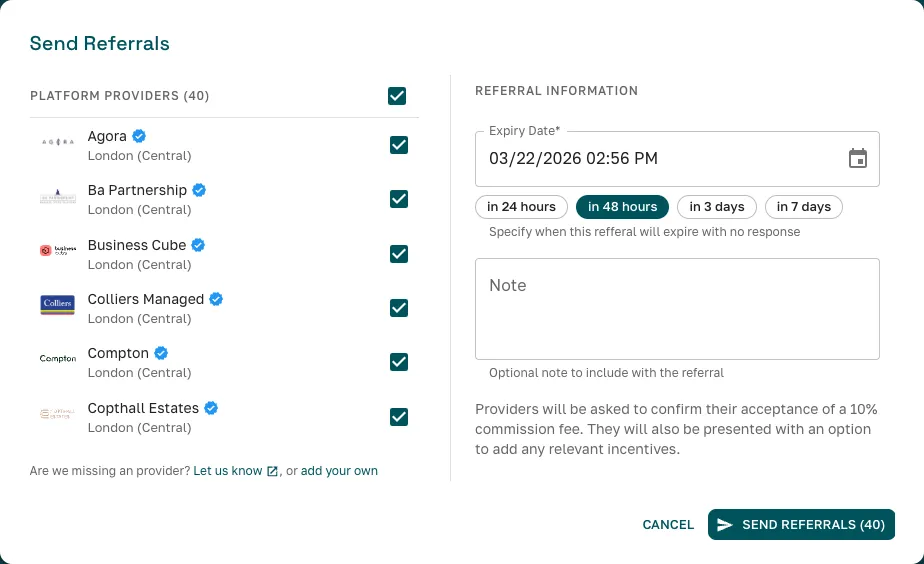
Get structured, comparable responses
Providers respond with available spaces, pricing, photos, and key details in a consistent format. Spend less time chasing information and more time evaluating options.
Learn more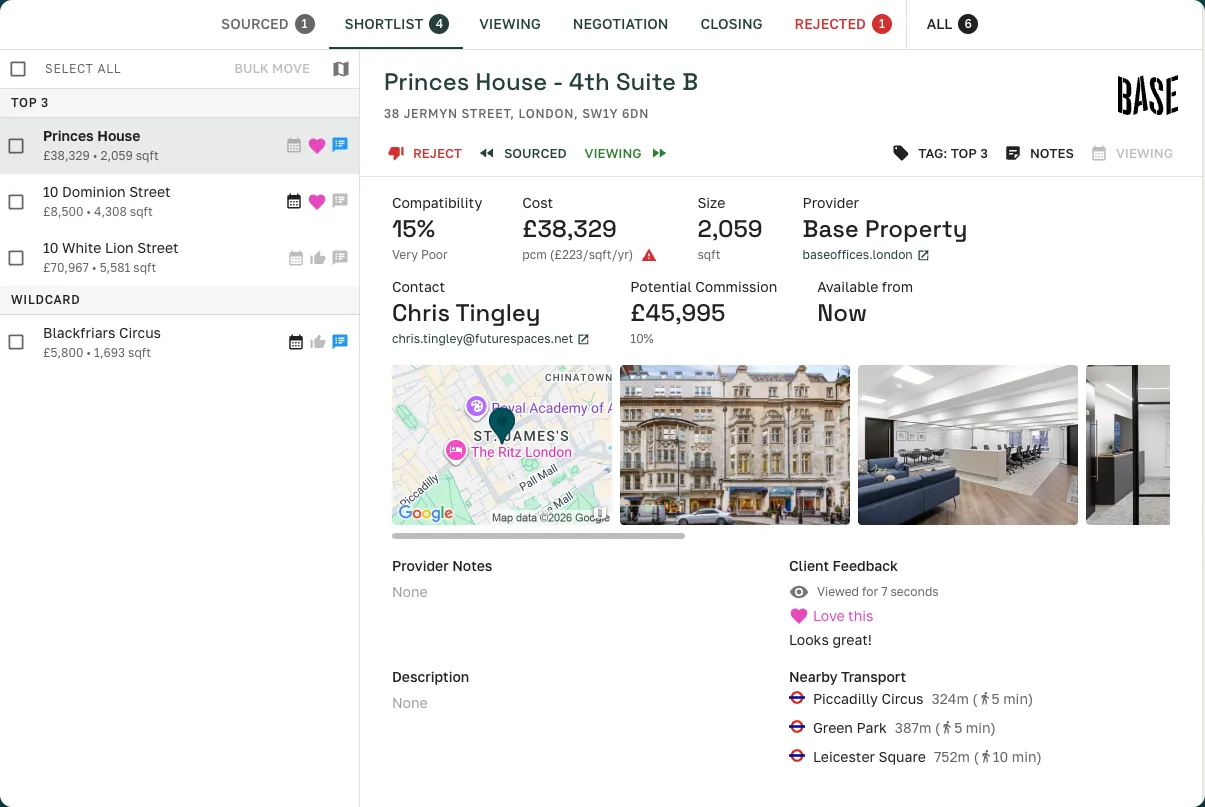
190+ verified provider network
Every workspace provider on Great Space has been verified and configured with their postcode coverage areas. Browse the full network, filter by location, and see who you'll be reaching before you send. Network access is included on every plan.
Learn more







AI compatibility scoring
Every provider response is automatically scored against your client's requirements and ranked. You still make the decisions — the AI puts the strongest matches at the top.
Learn more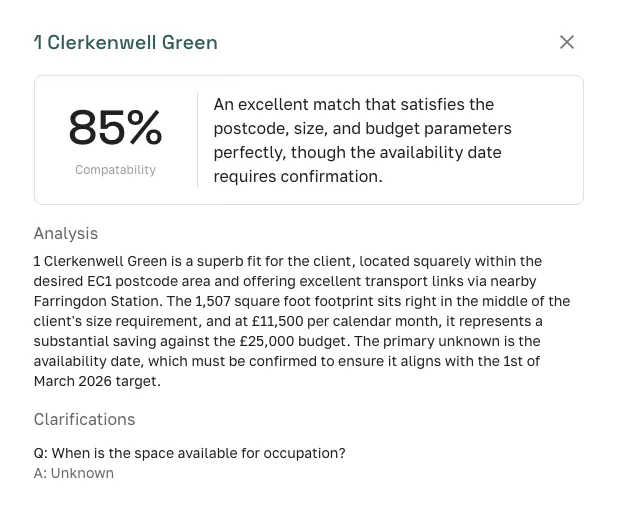
Automatic clarifications
When provider responses have gaps against your client's requirements, the platform automatically asks targeted follow-up questions. Answers feed directly into re-scoring — so your shortlist reflects the full picture, not just what was initially submitted.
Learn more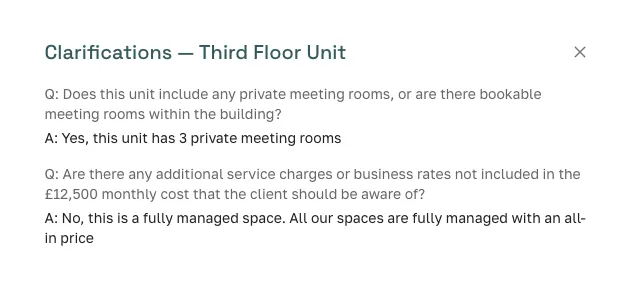
AI auto-rejection
Set a compatibility threshold on any deal and let AI filter out spaces that don't meet it. Low-scoring responses are automatically rejected — so you only review options worth your client's time. If a provider answers clarification questions and their score improves, the rejection is automatically reversed.
Learn more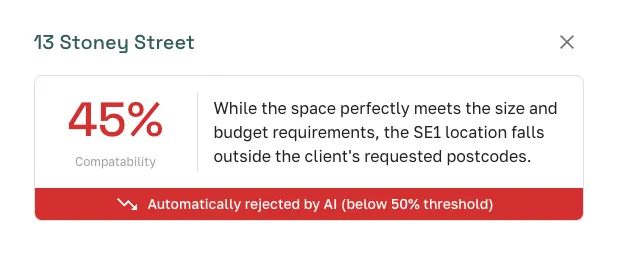
SpaceAI portal assistant
Open SpaceAI inside any provider's Portal and ask in plain English — which spaces fit your client's brief, what they cost, what the photos look like. It draws from the provider's live inventory and answers with space cards, prices, and cited photos.
Learn more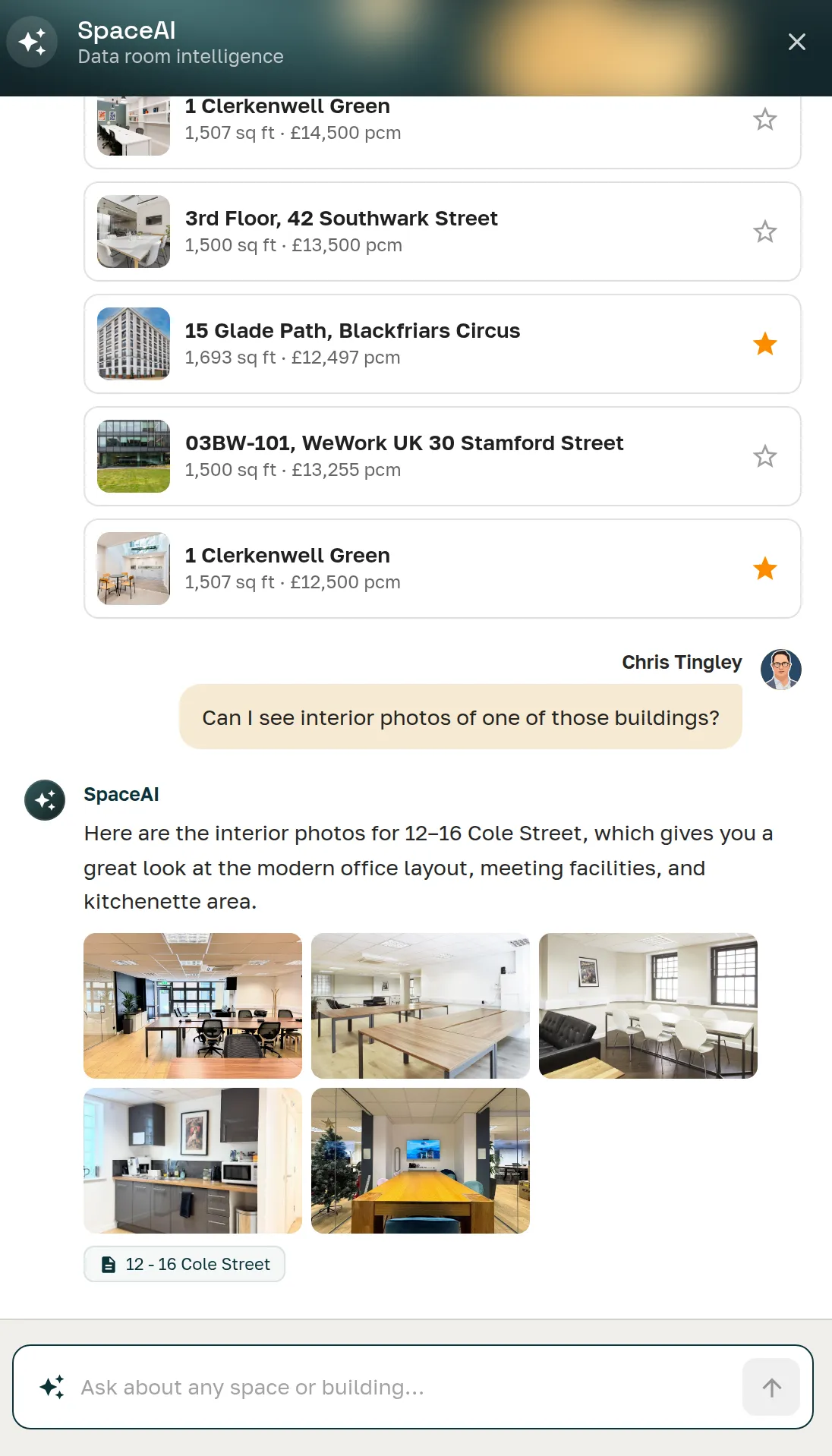
Client presentations in minutes
Create client-facing shortlists in minutes — no more decks cobbled from screenshots and PDFs. Clients browse spaces, leave ratings and feedback in-app, and you see exactly what they prefer.
Learn more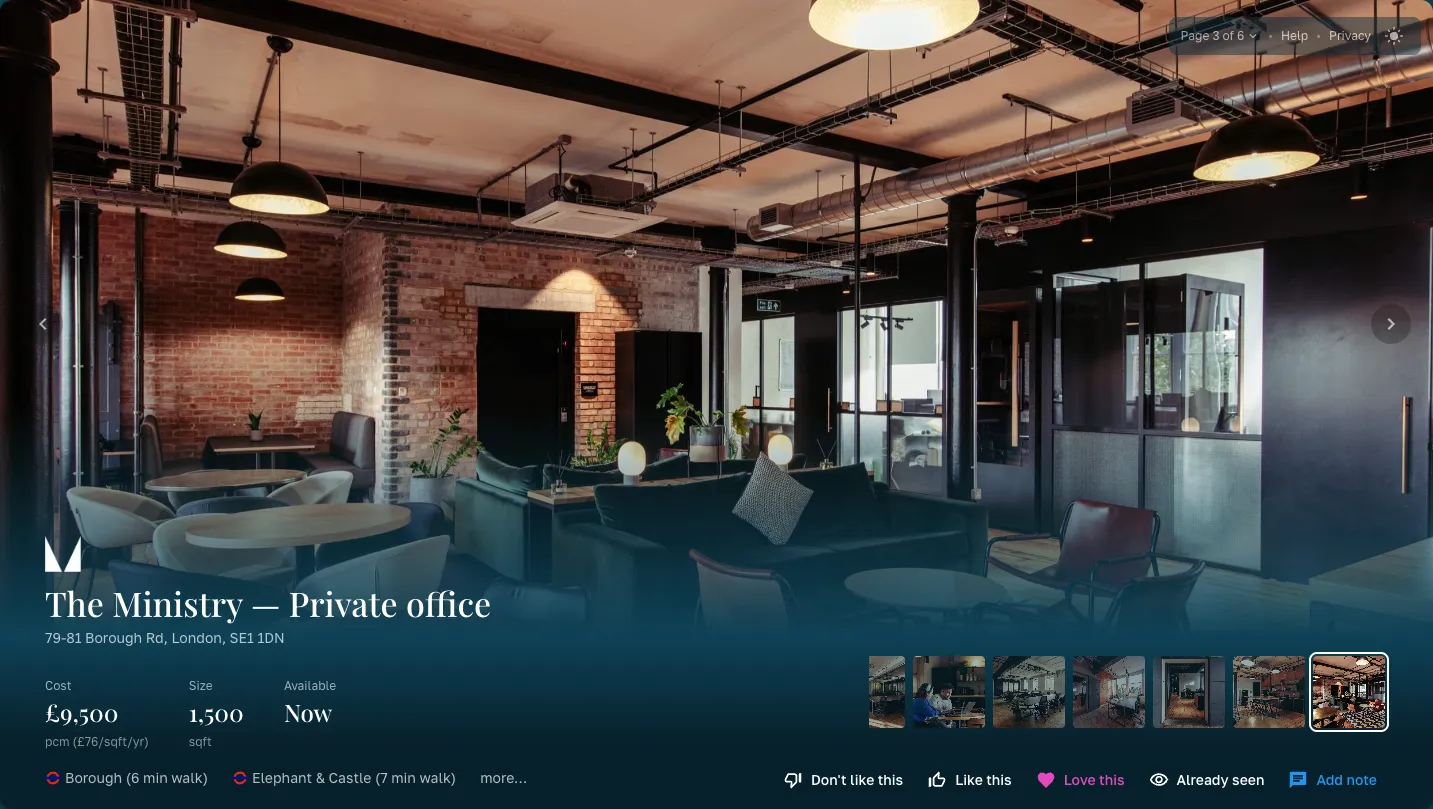
Viewing tour coordination
Schedule multi-provider viewing tours with drag-and-drop simplicity. Sync with calendars and keep clients and providers aligned without the back-and-forth.
Learn more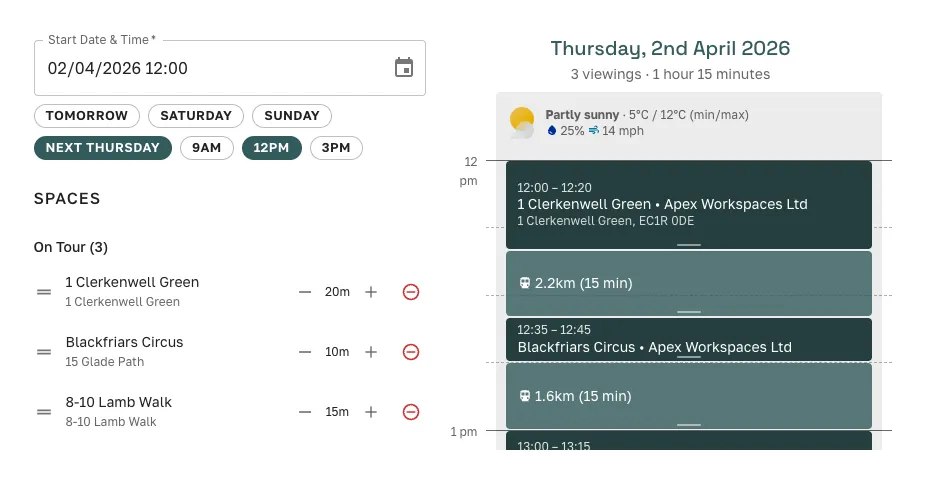
Full pipeline visibility
Track every deal through every stage — Sourcing, Shortlist, Viewing, Negotiation, Closing. See your entire book of business at a glance.
Learn more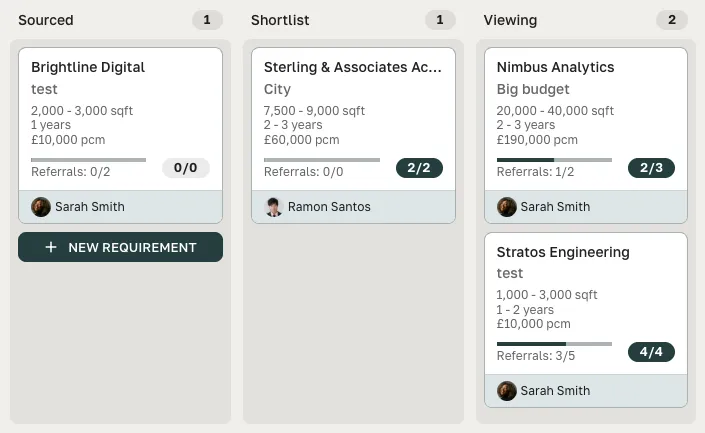
Financial performance at a glance
See how your team is performing month-to-month and quarter-to-quarter. Track revenue, closed deals, and which providers you're working with the most — all from a single dashboard.
Learn more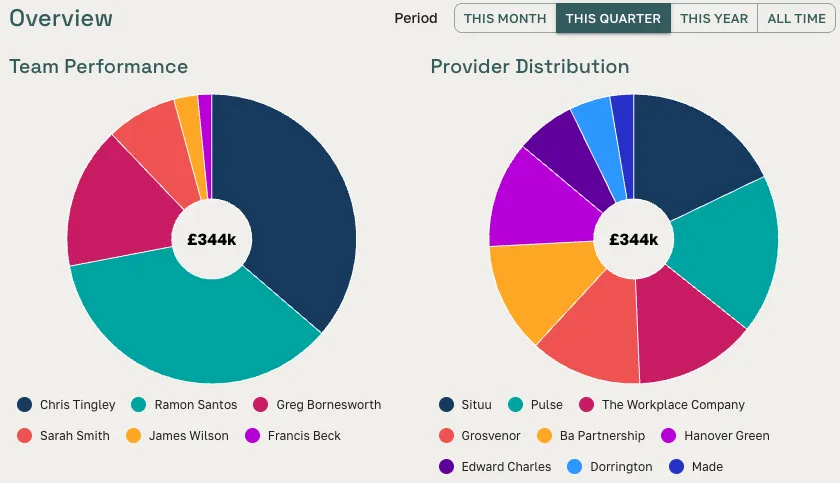
Contact management
Keep every contact and deal history in one place. Create deals directly from a contact record, and let SpaceAI match inbound enquiries to the right contact automatically.
Learn moreThe CRM that builds itself
A record that keeps itself, and channels that fill it
Every referral, webchat, directory enquiry, and website lead form submission becomes a contact and a deal — created for you, linked to the right people and the exact spaces you put forward.
Deal CRM
Not just a contact list — a CRM that tracks deals against live inventory, records custom relationship roles, and tells you which provider relationships respond fastest and convert best.
Explore the deal CRMBroker Directory
Get listed and get found. Occupiers looking for a broker send their requirement from your profile, and it opens in your pipeline as a live deal — a new inbound channel, not another inbox to watch.
Explore the directoryWebsite Lead Form
Add an enquiry form to your own website with one line of HTML. Every submission opens as a live deal, with the enquirer's company and contact created for you.
Explore the lead formProvider Portals
Browse live availability.
Add spaces straight to your deals.
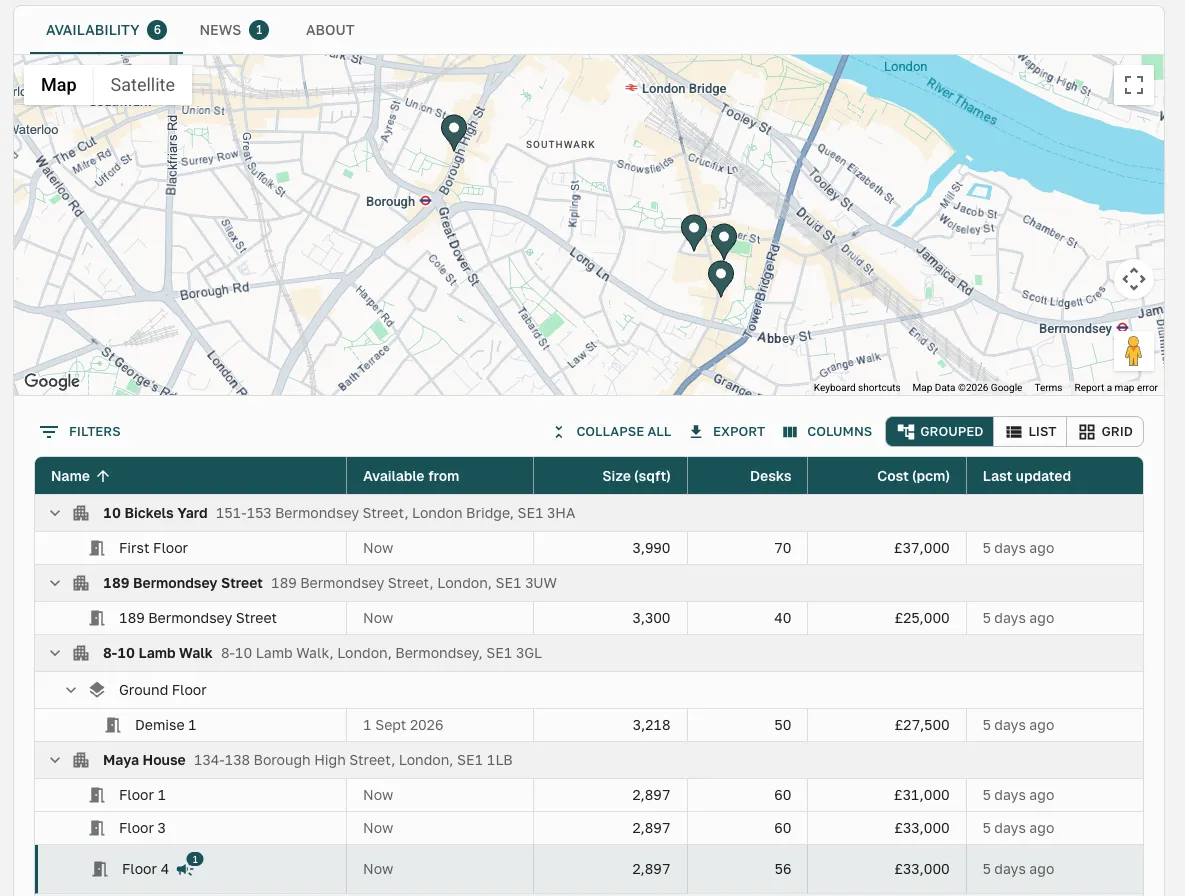
Subscribe to any provider's Portal and their live inventory is always one click away — buildings, floors, sizes, desk counts, and current pricing, updated in real time. No stale PDF, no email to check what's still on.
- Browse a provider's live availability the moment a matching enquiry lands — grouped by building, with size, desks, cost pcm, and last-updated
- Add relevant spaces directly to any open deal — pull matching options straight into your shortlist without leaving the portal
How It Works
Four steps from brief to deal
Create a deal
Enter your client's workspace needs — location, size, budget, term, and any other preferences. Takes about two minutes.
Send to providers
With one click, your deal reaches our network of 190+ verified workspace providers. You can also add your own contacts.
Review and shortlist
Responses come back structured and scored. Compare options, build a branded shortlist, and share it with your client for feedback.
Close the deal
Coordinate viewings, track negotiations, and manage your pipeline — all from one dashboard.
The old way vs. the Great Space way
Without Great Space
- × Email 30+ providers individually
- × Chase responses for 3-5 days across scattered inboxes
- × Cobble presentations from PDFs and screenshots
- × Coordinate viewings over endless email threads
- × Track pipeline in spreadsheets and memory
With Great Space
- Reach 190+ providers in 30 seconds
- Structured, comparable responses in one dashboard
- Interactive branded presentations in minutes
- Drag-and-drop tour coordination with calendar sync
- Contact records and pipeline — all in one place
FAQ
Frequently asked questions
How does Great Space help workspace brokers?
Great Space gives brokers a single platform to find providers, submit structured referrals, receive responses, generate client presentations, and track commission — replacing the fragmented mix of email, spreadsheets, and manual follow-up that currently defines flex workspace brokerage.
How do I refer a client to a workspace provider through Great Space?
Submit a referral with your client's requirements — desk count, location, budget, preferred start date, and term. Great Space matches the deal against the provider network and routes it to the most relevant providers. You track responses and manage the deal from your dashboard.
Does Great Space track commission for brokers?
Yes. Great Space records the commission terms agreed on each deal, tracks payment milestones, and flags when payment is due. This gives brokers a clear audit trail and reduces the friction of chasing providers for payment.
Which workspace providers are on Great Space?
Great Space's provider network spans flex and managed workspace providers across the UK, covering coworking, serviced offices, and managed office solutions. Providers are vetted before joining. The network is growing — if a specific provider is not yet listed, you can request them through the platform.
What software do flex workspace brokers use to manage deals?
Most flex workspace brokers currently manage deals through email and spreadsheets — there is no dominant purpose-built tool for this market. Great Space is built specifically for this gap: a deal platform that handles referrals, provider matching, client presentations, and commission tracking for flex and managed workspace brokers.
Is Great Space only for flex workspace, or does it cover managed workspace too?
Great Space covers both. Flex workspace (coworking, serviced offices, hot desks) and managed workspace (bespoke private offices delivered as a managed service) are distinct deal types with different commission structures and timelines. Great Space handles both, with deal flows configured for each type.
Your next deal starts here
Start free with 3 active deals — try everything before you upgrade.