Deal Pipeline
Your Whole Book of Business.
One View.
Create deals in minutes, distribute them with one click, and watch them move through every stage — without spreadsheets, status meetings, or chasing your team for updates.
Pipeline management is included on every plan, including Starter.
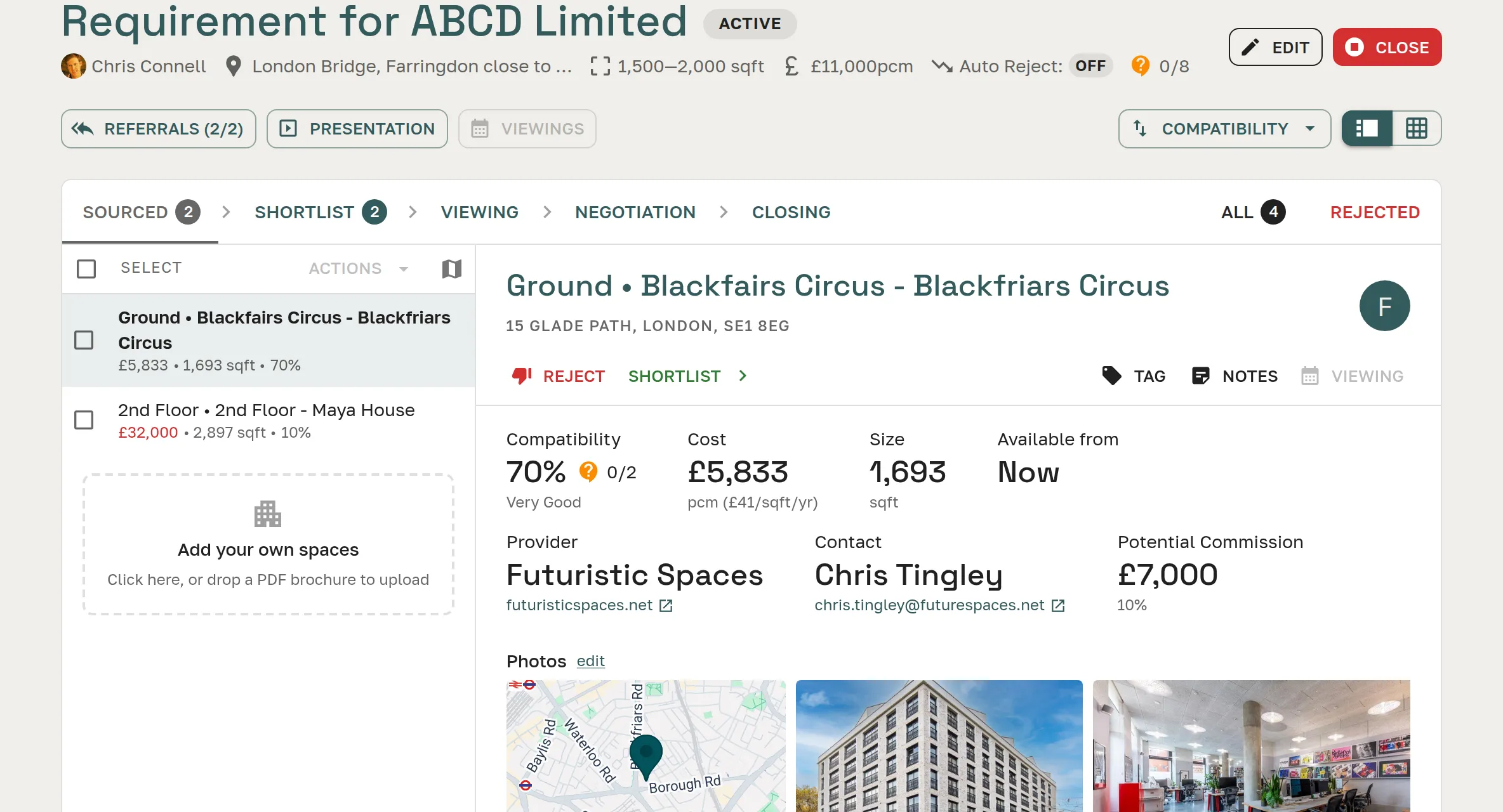
Pipeline Stages
Five stages.
Automatic transitions.
Every deal moves through a defined lifecycle. Stage transitions happen automatically when you take action — no manual housekeeping required.
Deal distributed to providers. Responses coming in.
Responses reviewed. Shortlist built and ready to share.
Viewing tour scheduled or in progress.
A space selected. Terms being agreed.
Heads of terms or agreement in progress.
Features
Pipeline built for workspace deals
From creation to close, every action updates your pipeline automatically. No separate CRM, no spreadsheet maintenance, no catch-up admin.
Every Deal, One Dashboard
See your full book of active business at a glance — every client, every deal, every current stage. Home page stat tiles show deal value (with a 28-day trend), open deals, and win rate, so you can spot momentum without digging into individual deals. No spreadsheets to maintain, no searching through email for where a deal is.
Five Stages from Search to Signature
Deals move through Sourcing → Shortlist → Viewing → Negotiation → Closing. Stage transitions happen automatically when you take action — distribute a deal, schedule a viewing, send a presentation.
Create in Under Two Minutes
Enter your client's needs — location, headcount, budget, lease term — and you're ready to distribute. Or paste the original client email and SpaceAI fills every field automatically.
Learn moreTeam and Portfolio Performance
Managers and admins see the pipeline across the whole team. Filter by stage, by client, or by broker to understand where deals are and what's progressing.
Search, Tag, and Filter
Tag deals by workspace type, sector, or deal complexity. Filter your pipeline to find exactly the deals you're working on without scrolling through a growing list.
Archive Without Losing History
When a deal closes — won, lost, or no longer active — archive it with an outcome note. The full history stays on record: every response, every presentation, every viewing.
See Matching Spaces on a Map
Switch a deal's spaces from split or table into a map view — pins coloured by stage, so you see at a glance how sourced, shortlisted, and closing options sit relative to each other and your client's target area.
"Catch Me Up" AI Briefing
One click on any deal opens SpaceAI with an instant briefing — where the deal stands, what's happened since you last looked, and what needs your attention next.
Learn moreCreating Deals
From client enquiry to live deal in under two minutes
Fill in a quick form — location, headcount, budget, lease term, move-in date — and your deal is ready to distribute. Or paste the original client message and SpaceAI extracts every field automatically, matches the contact record, and creates the deal with nothing left blank.
- Manual creation: two-minute structured form
- AI creation: paste any text, every field extracted automatically
- Contact matched to existing record or created automatically
- Distributed to 190+ providers in one click after creation
New Deal
Ashworth & Partners
Location
Headcount
Budget (pcm)
Lease Term
Move-in
Connected Workflow
Every deal feature connects back to the pipeline
The deal pipeline is the spine of the broker workflow. Every other feature — referral distribution, AI scoring, presentations, viewing coordination — attaches to it and keeps it current.
Referral Distribution
Distribute to 190+ providers in one click. Responses come back structured and AI-scored.
Learn more →Client Presentations
Build a branded shortlist from ranked responses and share it with your client in minutes.
Learn more →Viewing Coordination
Schedule viewing tours from the deal. Pipeline advances to Viewing automatically.
Learn more →Contact Management
Every deal links to the contact. Full deal history — responses, presentations, viewings — on one record.
Learn more →FAQ
Frequently asked questions
What are the deal stages in the Great Space deal pipeline?
Deals move through five stages: Sourcing (referral sent, responses incoming), Shortlist (options reviewed, ready to present), Viewing (tour scheduled or in progress), Negotiation (a space selected, terms being agreed), and Closing (heads of terms or agreement in progress). Stages advance automatically when you take action.
Does the pipeline update automatically when I take actions?
Yes. Sending a referral moves the deal to Sourcing. Scheduling a viewing moves it to Viewing. Creating an agreement moves it to Closing. You can also move deals manually at any stage.
Can managers see the full team's pipeline in Great Space?
Yes. Managers and admins see the complete pipeline across every broker on the team — filterable by stage, contact, or individual broker. This gives a clear view of deal flow and where the team's capacity is focused.
How do I close and archive a completed deal?
Mark the deal as won, lost, or no longer active. Great Space prompts for an outcome note, then archives the deal. The full history — every response, presentation, viewing, and agreement — is preserved for future reference.
Can I filter and search the deal pipeline?
Yes. The pipeline is filterable by stage, contact, broker, and workspace type. You can tag deals for sector or deal type and search across your active and archived book.
How does Great Space differ from managing a pipeline in a spreadsheet?
A spreadsheet requires manual updates, offers no integration with emails or documents, and breaks down for team use. Great Space updates the pipeline automatically as you work, keeps all referral data and provider responses attached to each deal, and gives managers a live view without anyone maintaining a shared file.
From first enquiry to signed agreement
Pipeline management is included on every plan — from 20 open deals on Starter.